Walk cycle sprite animation
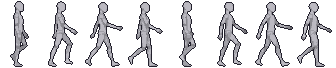
The classic. A walk cycle loops two steps: contact, down, passing, up, for each foot. Ours keeps the feet planted on contact frames so the character doesn't skate.
PNG sprite sheet + JSON frame data. Free for any project, including commercial games.
Specs
- Frames
- 8
- Suggested FPS
- 9
- Frame size
- 42×68
- Type
- Loop
- View
- Side view
Put your character on this motion
Describe or upload a character and we'll dress it onto this exact motion: same timing, same foot contacts, your art.
Costs 10 credits
Use the Walk cycle animation in your engine
The sheet is a single row (or a few rows) of equal-size frames with no padding, so every engine can slice it by frame size. Here is the minimum setup for the most common engines, already filled in with this motion's frame count, size and frame rate.
This is a looping motion: set the animation to loop and it will cycle seamlessly.
Godot 4
# AnimatedSprite2D > SpriteFrames > "Add frames from sprite sheet"
# Horizontal: 8, Vertical: 1, select all 8 frames.
$AnimatedSprite2D.sprite_frames.set_animation_speed("walk", 9)
$AnimatedSprite2D.sprite_frames.set_animation_loop("walk", true)
$AnimatedSprite2D.play("walk")
# Project Settings > Rendering > Textures > Default Texture Filter = Nearest
Unity
// Texture: Sprite Mode = Multiple, Filter = Point, Compression = None
// Sprite Editor > Slice > Grid By Cell Size: 42 x 68
// Drag all 8 sprites into the scene to create the clip, then:
// Animation window > Samples = 9, Loop Time = on
Phaser 3
this.load.spritesheet("walk", "walk.png", { frameWidth: 42, frameHeight: 68 });
// in create():
this.anims.create({
  key: "walk",
  frames: this.anims.generateFrameNumbers("walk", { start: 0, end: 7 }),
  frameRate: 9,
  repeat: -1,
});
player.play("walk"); // with pixelArt: true in the game config
Frame by frame
Every frame of the mannequin sheet, in order. Use it as a timing reference when you draw your own frames, or to pick the frame where gameplay should react.
Questions about this motion
Can I use the mannequin sheet in a commercial game?
Yes. The mannequin sprite sheets are free to use in any project, commercial included. Credit is appreciated but not required.
How do I put my own character on this Walk cycle animation?
Open the generator, describe or upload your character and pick this motion. The AI dresses your character onto the exact same timing and poses, so the result lines up with the mannequin frame for frame.
Why are my frames blurry in the engine?
Your engine is filtering the texture. Set the filter to Nearest (Godot), Point (Unity) or pixelArt: true (Phaser) so each pixel stays sharp.