规格
- 帧数
- 12
- 建议 FPS
- 10
- 单帧尺寸
- 46×69
- 类型
- 单次
- 视角
- 侧视角
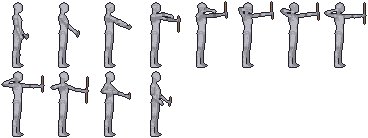
把你的角色套到这个动作上
描述或上传一个角色,我们会把它“穿”到这个动作上:同样的节奏、同样的脚步落地点,换成你的美术。
消耗 10 积分
在引擎中使用拉弓射箭动画
精灵图集是一行(或几行)等大的帧,没有内边距,所以任何引擎都能按帧尺寸切片。下面是最常用引擎的最简设置,已经填好了这个动作的帧数、尺寸和帧率。
这是单次动作:播放一次,结束后切回待机(死亡动画则停在最后一帧)。
Godot 4
# AnimatedSprite2D > SpriteFrames > "Add frames from sprite sheet"
# Horizontal: 8, Vertical: 2, select all 12 frames.
$AnimatedSprite2D.sprite_frames.set_animation_speed("shoot_bow", 10)
$AnimatedSprite2D.sprite_frames.set_animation_loop("shoot_bow", false)
$AnimatedSprite2D.play("shoot_bow")
# Project Settings > Rendering > Textures > Default Texture Filter = Nearest
Unity
// Texture: Sprite Mode = Multiple, Filter = Point, Compression = None
// Sprite Editor > Slice > Grid By Cell Size: 46 x 69
// Drag all 12 sprites into the scene to create the clip, then:
// Animation window > Samples = 10, Loop Time = off
Phaser 3
this.load.spritesheet("shoot-bow", "shoot-bow.png", { frameWidth: 46, frameHeight: 69 });
// in create():
this.anims.create({
  key: "shoot-bow",
  frames: this.anims.generateFrameNumbers("shoot-bow", { start: 0, end: 11 }),
  frameRate: 10,
  repeat: 0,
});
player.play("shoot-bow"); // with pixelArt: true in the game config
逐帧分解
人偶图集的每一帧,按顺序排列。自己画帧时可以用它作为节奏参考,也可以用来确定游戏逻辑该在哪一帧响应。
关于这个动作的常见问题
人偶精灵图集可以用在商业游戏里吗?
可以。人偶精灵图集可免费用于任何项目,包括商业项目。欢迎注明出处,但不强制。
怎样把我自己的角色套到这个拉弓射箭动画上?
打开生成器,描述或上传你的角色,然后选择这个动作。AI 会把你的角色套到完全相同的节奏和姿势上,结果与人偶逐帧对齐。
为什么我的帧在引擎里看起来很模糊?
引擎在对纹理做过滤。把过滤方式设为 Nearest(Godot)、Point(Unity)或 pixelArt: true(Phaser),每个像素就会保持锐利。